
Guide
TikTok for books: reading in a vertical feed
People who search for a TikTok for books usually mean one of two things. Some want BookTok: short videos about books, which live on TikTok itself. Others want the feed without the videos: something to swipe through that leaves them having actually read something. This page is about the second, and it is the idea Doomreader is built on.
Updated 10 Oct 2026
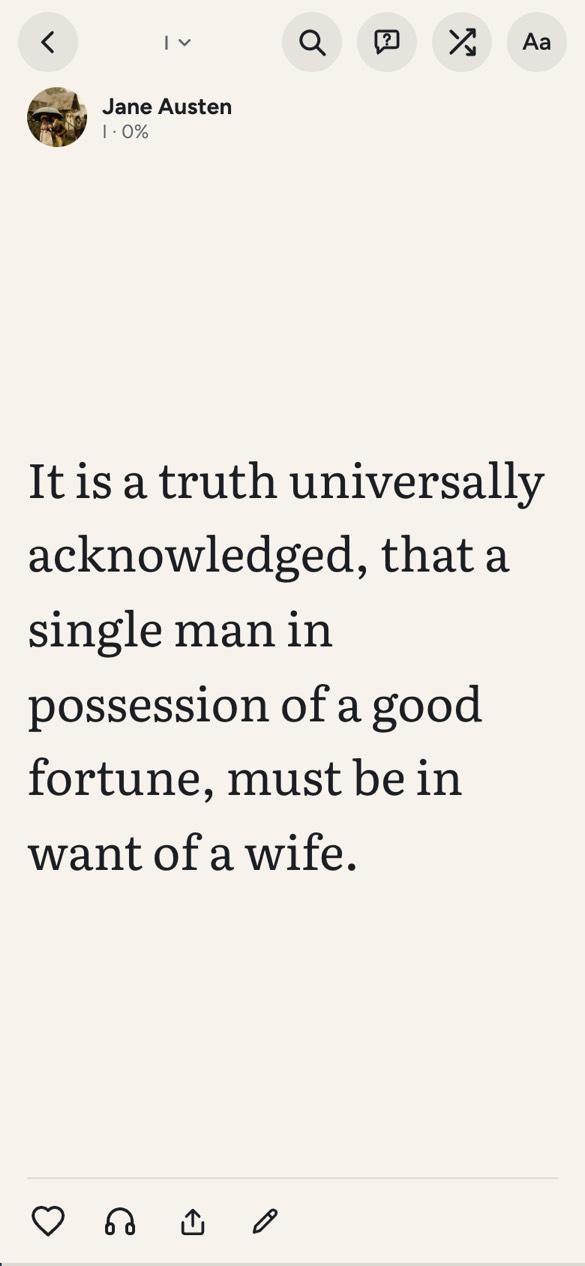
We will be plain about what it is good for and where a normal reader is better.
How a book becomes a feed
A book is cut into posts, each one screen tall, at paragraph breaks so a thought is never split mid-sentence if it can be helped. You swipe up for the next, exactly as in a video feed, and the book moves forward. Chapter titles get their own post, so you always know where you are, and your place is saved on every swipe.
You can read one book in order, or pick several and read them mixed on one wall, each post labelled with its book. That sounds chaotic and is surprisingly pleasant for essays, poetry and short stories.
Discovering books in the feed
The part closest to TikTok is Discover: a feed of the best opening scenes and lines from thousands of free classics, mixed across books. When a passage grabs you, keep reading from that page, and the whole book opens. It is a way of choosing books by their writing rather than their covers or their reviews.
There are also short reading paths, ordered journeys through a subject, such as Gothic horror or detective fiction from the start.
What it is good for
It suits people who read on their phone in short gaps and lose their place in normal reader apps, people whose attention drifts on a dense page (a screen-sized piece is less daunting), and anyone trying to replace a social feed with something that adds up. Your own EPUBs, PDFs and saved articles work the same way, so it is not limited to our books.
Where it is not the right tool
Books that depend on layout (textbooks with diagrams, comics, heavily formatted PDFs) read better in a page-based reader. Scanned PDFs have no text to cut into posts. And if you like long, uninterrupted sessions with a paper book, there is nothing wrong with that; this is for the other moments.
What sets Doomreader apart is the free classics with their best passages picked out, saved web articles and newsletters in the same feed, and asking questions of a book with AI.
Why a feed format can help you read more
A feed lowers the cost of starting. Opening a novel to a dense page asks for a decision; a single screen of text asks only for a swipe, and the next one follows naturally. That is the idea behind the format: the book is always open at the right place on the device already in your hand, so restarting a stalled book costs one tap.
It also changes what a reading session is. Five swipes in a queue are a real session, and they add up: a hundred posts is roughly a short novel's chapter or two. Doomreader counts the posts you actually read toward a small daily goal, so the habit builds itself from moments you used to spend on other feeds.