Doomreader
EPUB to audiobook: listen to your own EPUB, free
You have the book as an EPUB and you would rather hear it: on the walk to work, while cooking, with tired eyes at the end of the day. Doomreader turns your own EPUB into an audiobook without any converting. Open the file, tap the headphones, and your phone's own voice reads it to you for free, sentence by sentence, from wherever you are in the book. When you want a voice closer to a person, natural AI voices read it instead.

To be clear about what this is: it is text to speech of your file, played inside Doomreader as you listen. It is not a narrated recording, and it does not make an MP3 or M4B to download. In return there is nothing to wait for, the words are on screen as you hear them, and your place is kept whether you read or listen.
How to turn an EPUB into an audiobook
Open Doomreader in your browser, or the free app from Google Play on Android, and in the Library tap Choose an EPUB or PDF. Pick the EPUB from your phone or computer. It goes into your library on that device and opens at the start, as short posts that fit the screen.
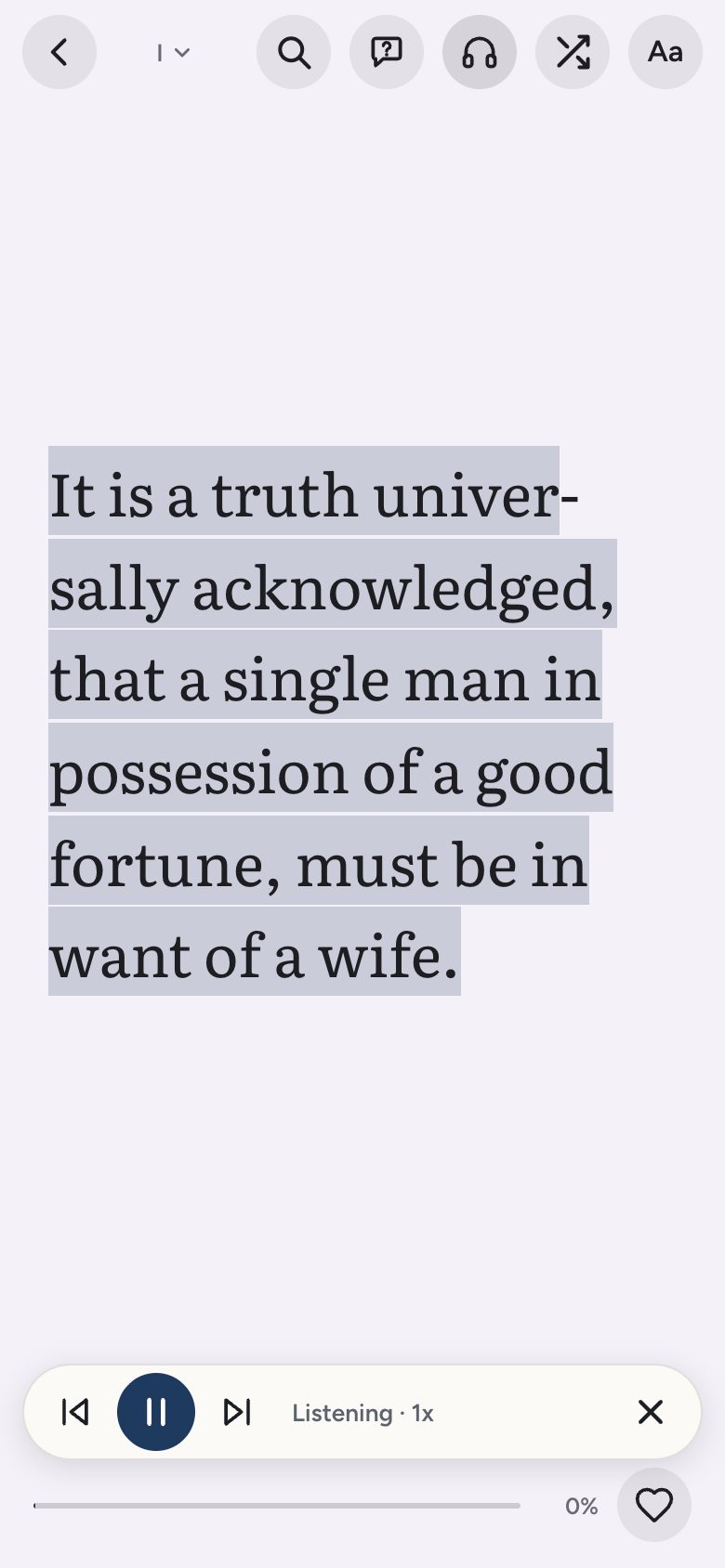
Tap the headphones. The voice starts at the post on screen and the feed moves on by itself as it reads, highlighting the sentence being spoken. Pause, go back a post or skip ahead from the bar at the bottom, and step the speed from 0.75x up to 2x. Stop whenever you like: your place is saved just as it is when you scroll, so you can listen to a chapter and read the next one.
Free: your phone's own voices
The free voices are the ones already on your phone or computer, the same ones it uses to read out a message. Doomreader picks the best one for the book's language and you can choose another under Aa. Listening this way costs nothing, needs no account, and sends none of the book's text to Doomreader: the speech is made on your device, so it works offline with the voices your phone has installed. (In Chrome on a computer, its Google voices are spoken by Google's servers.)
Device voices vary from one phone or computer to the next, and some sound flat over a long novel. That is the trade for free and private.
Natural AI voices, with credits
For a long listen there are natural voices made with Google's Gemini: four for each of Doomreader's seven languages, two female and two male, chosen under Aa while the book is open. They use AI credits, 1 credit for each 150 words read aloud, counted by words, so listening at 2x costs the same as at 1x. A long novel of 90,000 words would take about 600 credits, so most people use the free voices for whole books and a natural voice for the parts they care about.
Credits are bought once on the purchase page, not as a subscription, with or without Pro, and you sign in to use them. With a natural voice, each paragraph's text is sent to our server to make its audio; a paragraph you have heard before plays again free from your device.
Which EPUBs work
Any EPUB without DRM: books from Standard Ebooks and Project Gutenberg, many independent publishers and authors, and files you made yourself with a tool such as calibre. Books bought from Kindle, Apple Books or Kobo usually carry DRM (copy protection), and no other app can open those. PDFs with real text work too; see reading a PDF aloud.
Pictures are passed over when listening and the cover is read as the title and the author, so you hear the book, not its layout. Each chapter title is read briefly, so you hear where a new one begins.
Listening on the go
A book you add stays on your device, so it opens without a connection, and the free voices read it offline. Keep Doomreader on screen while it reads: on Android, the phone's own voice may stop when the screen locks. Natural voice audio needs a connection the first time each paragraph is played, and is kept on your device after that.
Comparing readers for this? Our best EPUB reader apps guide says which others read aloud, and which charge for it.
No EPUB to hand? 3,000 classics are ready
Doomreader comes with more than 3,000 public domain classics in seven languages that play the same way, from Pride and Prejudice to Meditations. See the free audiobooks, or tap one below to start listening.