
Guide
Best EPUB reader apps for Android in 2026
An EPUB reader has one job: open the book file you already have and make it pleasant to read for hours. Most do that well now, so the real differences are smaller and more personal. Which phone you use, whether you want the book read aloud, whether you care about sync, and whether you would rather pay once, pay yearly or see adverts.
Updated 14 Oct 2026
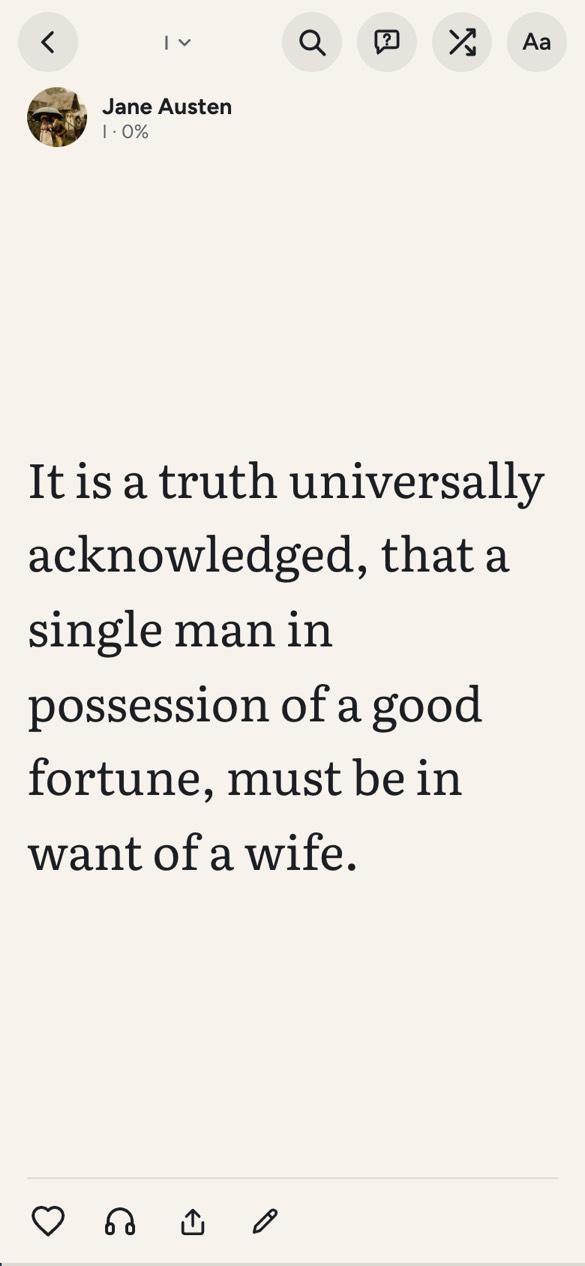
We make Doomreader, so it is first on this list, and we say why. Every other app here is one we would happily recommend to the right reader. Each has what it does well and where it falls short, from its own store listing or website, checked on 14 October 2026. Prices are in US dollars as those pages showed them, and the sources are at the end.
The best EPUB readers at a glance
| App | Best for | Price | Works on |
|---|---|---|---|
| Doomreader | Reading on a phone in short bursts, and listening free | Free; Pro adds sync | Android app, any browser, iPhone in Safari |
| ReadEra | A free reader with no ads for many formats | Free; Premium $14.99 once | Android, iPhone, iPad |
| Moon+ Reader | Tuning every detail of the page | Free with ads; Pro $11.99 once | Android |
| Lithium | A simple, clean EPUB reader | Free; Pro $1.99 once | Android |
| Google Play Books | Your EPUBs beside books you buy from Google | Free app | Android, iPhone, web |
| Apple Books | iPhone, iPad and Mac readers | Free app | iPhone, iPad, Mac |
| Kindle with Send to Kindle | Reading your EPUBs on a Kindle | Free app and service | Kindle devices, Android, iPhone, computers |
| Readest | Open source, on every platform | Free; paid tiers from $4.99 a month | Android, iOS, Windows, Mac, Linux, web |
| Koodo Reader | A desktop library with mobile apps | Free; Pro $4.99 a year | Windows, Mac, Linux, Android, iOS, web |
1. Doomreader: the best EPUB reader for reading on your phone
Doomreader opens any EPUB without DRM and shows it as a feed of short posts that fit the screen, one at a time, so a book reads the way a phone wants to be read: in the queue, on the bus, in ten-minute gaps. Prefer pages? The book look sets the same cards like pages, each with a colour of its own. Your place is kept to the card, and the progress bar lets you jump to any chapter and back.
Tap the headphones and your phone's own voice reads the book aloud, free, highlighting the sentence. Natural AI voices are there too, paid with AI credits. Highlights, notes, five fonts and the themes are free, and more than 3,000 public domain classics come with it. It runs in the free Android app or any browser, with no sign-up; Pro syncs your books and place across devices. More on listening to your own EPUB.
Good
- A feed of short cards made for phones, or a book look with pages
- Read aloud free with the device's voices, highlighting the sentence
- No sign-up, no adverts, and your file stays on your device
- 3,000+ free classics in seven languages built in
Not so good
- Opens only EPUB and PDF: no MOBI, AZW3, FB2 or comics
- No app in Apple's App Store; on iPhone it runs in Safari
- Sync across devices needs Pro
2. ReadEra: the best free EPUB reader for Android with no ads
ReadEra is the reader we suggest to anyone who wants one free app for everything on an Android phone. It opens EPUB, PDF, Word documents, MOBI, AZW3, DjVu, FB2 and more, and its listing says it has no ads and needs no sign-up. There is an iPhone and iPad version as well.
The paid side is a one-off: ReadEra Premium, a separate app, adds sync through Google Drive and reading aloud in the background on Android.
Good
- Opens almost any ebook or document format
- No ads and no account
Not so good
- Sync and background read-aloud on Android are in the paid Premium app
- Pages, not a feed: it reads like a classic e-reader
3. Moon+ Reader: the most customisable EPUB reader for Android
Moon+ Reader has been the power user's choice on Android for years. Margins, paging animations, gestures, themes, fonts: nearly everything can be changed. It reads EPUB, PDF, MOBI, AZW3, FB2, comics and more, and it can back up and sync your reading position through Dropbox or WebDAV.
The free version carries adverts. Moon+ Reader Pro removes them, and its listing names text to speech among Pro's features.
Good
- The deepest settings of any reader here
- A very wide range of formats
Not so good
- Adverts in the free version
- Read aloud is listed as a Pro feature
- Android only
4. Lithium: a simple EPUB reader for Android
Lithium does less, on purpose. It is an EPUB reader only, with a clean look, highlights and night themes, and its listing calls it ad-free, apart from the odd offer to upgrade. If ReadEra and Moon+ feel busy, this is the calm one.
Lithium Pro, a $1.99 licence app, adds syncing your reading position through Google Drive; the listing notes that the books themselves are not synced. Neither listing mentions reading aloud.
Good
- Simple and quick to learn
- No ads
- Cheapest upgrade on this list
Not so good
- EPUB only
- No read aloud mentioned
- Books are not synced, only positions (Pro)
5. Google Play Books: your EPUBs beside the books you buy
Play Books is a store first, but Google's help pages say you can upload your own EPUB and PDF files and read them on any device you sign in to, with your place and notes synced. If you already buy ebooks from Google, keeping your own files in the same library is convenient, and the app is free.
Its Read Aloud is free too, though Google says publishers decide whether it is available for a book; whether it works on files you upload, we could not confirm.
Good
- Your uploads sync free across devices
- Your own books and bought ones in one library
Not so good
- Built around Google's store and account
- Read Aloud on uploaded books unverified
6. Apple Books: the easy choice on iPhone, iPad and Mac
On Apple devices, Apple Books is already there, free, and good. Apple's guide says it imports many EPUB books and PDFs, and iCloud keeps your library on your other Apple devices. Typography and themes are polished.
It stays inside Apple's world: there is no Android or Windows version. Apple's built-in Read Aloud is for books that include the feature; for others, the iPhone's own Speak Screen is the usual way round.
Good
- Already installed, polished and free
- iCloud sync of your imported books
Not so good
- Apple devices only
- Read Aloud only for books that include it
7. Kindle with Send to Kindle: for reading EPUBs on a Kindle
The Kindle app does not open an EPUB file directly, but Amazon's Send to Kindle service does take EPUB, free, by email, from its website (files up to 200 MB) or from its apps. The book is then in your Kindle library on your Kindle device and in the free Kindle apps, with your place, highlights and notes synced. Amazon's Assistive Reader reads aloud in the free apps.
The catch is that the file goes through your Amazon account, and Amazon refuses encrypted files, so EPUBs with DRM from other stores will not go. Our Kindle app comparison goes into the differences.
Good
- The best way to put your EPUBs on a Kindle e-reader
- Free sync and read aloud in the apps
Not so good
- Every book goes through Amazon's cloud and account
- No opening a file straight from your phone
8. Readest: an open source reader on every platform
Readest is free, open source and runs nearly everywhere: Android, iOS, Windows, Mac, Linux and the web. It opens EPUB, PDF, MOBI, AZW3, FB2, comics, TXT and Markdown, and the free plan includes 500 MB of its own cloud sync, or your own Google Drive, OneDrive or WebDAV.
Its AI read aloud is in the free plan with a cap its pricing page does not state; paid tiers at $4.99 and $9.99 a month add more storage, more read-aloud hours and more AI translation.
Good
- Free sync between all your devices, open source
- Many formats
Not so good
- Heavy listening and translation sit in monthly paid tiers
- The free read-aloud cap is not stated
9. Koodo Reader: a desktop library with mobile apps
Koodo Reader started on the desktop and now runs on Windows, Mac, Linux, Android, iOS and the web. It reads EPUB, PDF, MOBI, AZW3, TXT and comics among more than fifteen formats, and is open source.
Its pricing page puts sync with your own cloud (OneDrive, Google Drive, Dropbox, WebDAV) under Pro, at $4.99 a year as a limited-time offer, and caps free use on phones at 20 books.
Good
- Strong on the desktop
- Cheap yearly Pro, with no automatic renewal
Not so good
- Free on phones is capped at 20 books
- Sync is a Pro feature
Which EPUB reader should you choose?
On Android, if you want one free app for every format, ReadEra. If you want to tune everything, Moon+ Reader. If you want the book on a Kindle, Send to Kindle. On an iPhone, Apple Books is already there. If you move between a laptop, a phone and a Linux machine, Readest or Koodo.
And if you read mostly on your phone, in short gaps, and like having the book read aloud for free when your eyes are tired, try Doomreader. It costs nothing to open a book in the online EPUB reader and see whether the feed suits you. Reading PDFs as well? See the best PDF reader apps.