
Doomreader
Read later app: save it, then actually read it
Save it, then actually read it. Most read later apps are very good at the first half: you save a long piece at lunch, the list grows to three hundred, and the only thing you ever do with it is scroll past it. Doomreader is built for the second half. Each article you save becomes a short run of cards you swipe through, one screen at a time, with your place kept, and every card counts toward the same daily reading streak as your books.

Books and articles live in one habit, in the browser or the Android app. It is free to start, and you do not need an account to save your first piece.
Doomreader and the other read later apps
| Doomreader | Instapaper | Matter | Readwise Reader | Omnivore | ||
|---|---|---|---|---|---|---|
| Status | Active | Active | Active | Active | Shut down in November 2024 | Shut down on 8 July 2025 |
| Price | Free; Pro and AI credits, see the pricing page | Free; Premium $5.99 a month or $59.99 a year | Free; Premium $8 a month or $60 a year on the web unverified | $12.99 a month, or $9.99 a month paid yearly unverified | Was free | Was free, with Premium |
| Free plan | 25 saves a month, kept on your device | No cap on saves; notes capped at 5 a month | No cap on saves | No free plan; a 30-day trial | Gone | Gone |
| Platforms | Web, Android, a Chrome and Edge extension | iPhone, Android, web, browser extensions | iPhone, iPad, Mac, web; no Android unverified | Web, iPhone, Android, Mac, Windows, browser extensions | Was iPhone, Android, web | Was everywhere |
| Import | Pocket, Instapaper and Omnivore files | Pocket and others unverified | Pocket unverified | Pocket, Instapaper, Matter, RSS | n/a | n/a |
| Newsletters | Pro: your own forwarding address | A save-by-email address unverified | Yes, with Premium | Yes, a forwarding address | Was free | No |
| Highlights | Free; export to Notion or Obsidian with Pro | Yes; notes past 5 a month need Premium | Yes; export to Notion, Obsidian, Readwise | Yes, its strength | Was free | Was free |
| Read aloud | Free in your device's voice; AI voices with credits | Yes; AI voices and playlists with Premium | Yes; HD voices with Premium | AI voices, included | Was free | Was free |
| Daily streak | Yes, books and articles together | No | A daily goal and streak unverified | No | No | No |
Every way to save
Save wherever you find the article, and it all lands in the same Articles tab:
Paste a link into the Articles tab, in the browser or the Android app. On Android, share a link to Doomreader from any app, the browser, X, Reddit or a chat, and it is saved and opened straight away. On a computer, the Chrome and Edge extension adds a toolbar button, a right-click item and a keyboard shortcut; on any other browser, the one-click bookmark button below does the same job. With Pro you get your own email address: forward a newsletter or a link to it and it arrives too. And if you are leaving another app, import its export file: in the Library tap Import and pick Pocket, Instapaper or Omnivore.


The Chrome and Edge extension
Click the Doomreader button in your toolbar, press Alt+Shift+S, or right-click a page or a link and choose Save to Doomreader. The extension connects to your account once, from the app, and gets a key that can only save links: it never sees your password, your books or your notes, and you can disconnect it from your account page. The links you save wait for you and arrive the next time you open Doomreader. Details and the install link are on the extension page.

Save from your computer
Drag this button to your bookmarks bar. Then, on any article in your browser, click the bookmark: Doomreader opens in a new tab with the article saved and ready to read. It counts as one save, like a pasted link. It works in any browser, Safari and Firefox included.
Saved articles become swipeable cards
An article becomes the same feed as a book: a cover with the title and site, then the text cut at paragraph breaks into cards that fit the screen. Your place is kept, so a fifteen-minute essay can be read in five sittings without hunting for where you were. Choose the social look, where each card reads like a post, or the book look, where cards sit like pages.
Saved articles can also join the mix on your wall, so a long read can turn up between pages of the novel you are reading. Some people like that and some switch it off; it is one setting.
Every card counts toward your streak
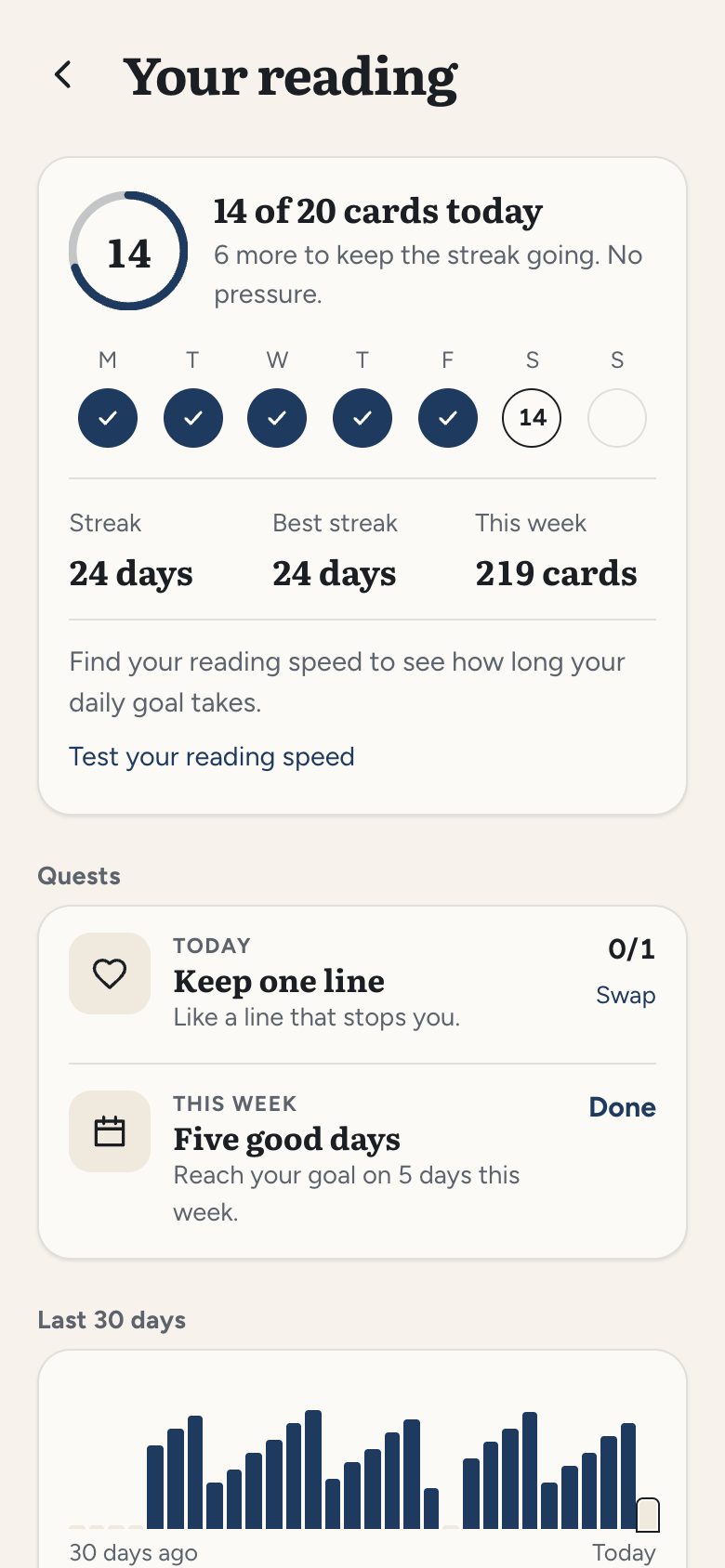
The ring at the top of the app fills toward today's goal with every card you read, from a book or an article. Read a saved essay on the bus and your streak is safe for the day. That is the point of putting them together: the articles you meant to read become part of a daily habit instead of a list you feel bad about. See the reading tracker for streaks, goals and the weekly quests.
Highlights, notes and listening
Highlight a sentence or a whole card, write a note beside it, or share a line as an image; all of that is free and stays with the article. With Pro, you can export them to Notion, Obsidian or Markdown.
Any saved article can be read aloud free, in your phone's or computer's own voice, with the sentence being read highlighted. The more natural AI voices, and asking the article a question, use AI credits.
Newsletters, blogs and RSS in the same tab
The Articles tab also follows blogs, Substacks and RSS feeds, up to 10 free or 500 with Pro, and Pro gives you a personal email address for newsletters that only come by email, each with an Unsubscribe that works from inside the app. New posts arrive by themselves, ready to read the same way. The RSS and newsletter reader page has the details.
Free and Pro
Without Pro you can save 25 articles a calendar month, one allowance whether you paste a link, share one, import or save from the browser extension, and everything you save stays on your device. With Pro you keep as many as you like, and they sync across your devices with your place, highlights and notes. Pro also adds search inside every article and book (titles are searchable free), export, word flashcards and following up to 500 blogs instead of 10.
Coming from Pocket, Instapaper or Matter
Pocket shut down in July 2025 and Omnivore in November 2024. If you kept your export file, our Pocket alternative page walks you through bringing it in, step by step. There are side-by-side pages for Instapaper, Matter and Readwise Reader too. Comparing more apps? See the best read later apps.
What it cannot save
Pages behind a sign-in or a paywall give only what a signed-out visitor sees. Medium refuses requests that do not come from a real browser, so Medium posts cannot be saved at the moment. Wikipedia saves, but loses its section headings. Pictures are shown through Doomreader's own server, so the picture's site never sees you reading. Most news sites, Substack posts and personal essays save well.