
Guide
Best PDF reader apps in 2026, free and paid
The best PDF reader depends on what the PDF is. A contract to sign, a form to fill in and a textbook to read for a month are different jobs, and no app is best at all three. Document tools such as Adobe Acrobat are built for the first two. Reading a long PDF on a phone is the third job, and the one most PDF readers do worst: pinch, zoom, pan along the line, pan back, lose your place.
Updated 14 Oct 2026
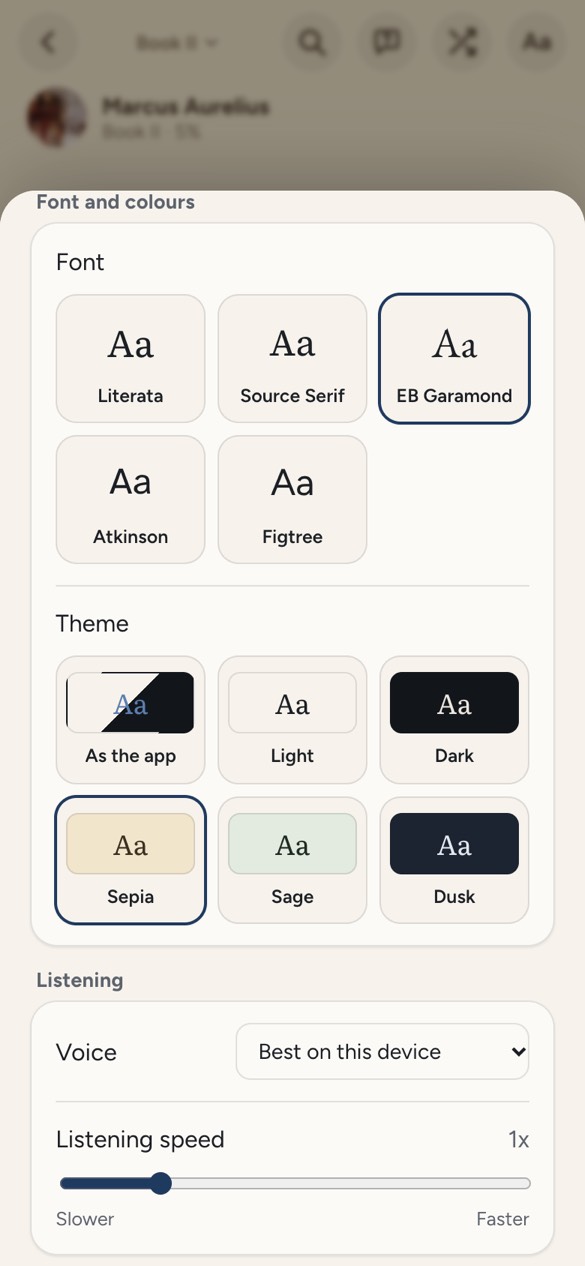
We make Doomreader, so it comes first, for that third job only, and we are plain about what it cannot do: it does not edit, sign or annotate pages, and it cannot read scanned PDFs. The other apps are the ones we would suggest for the rest. Facts are from each app's website, store listing or help pages, checked on 14 October 2026, with prices in US dollars as shown there. Sources are at the end.
The best PDF readers at a glance
| App | Best for | Price | Works on |
|---|---|---|---|
| Doomreader | Reading long text PDFs on a phone, and listening | Free | Android app, any browser |
| Adobe Acrobat Reader | Signing, filling in and marking up documents | Free; Premium from $12.99 a month in the App Store | Windows, Mac, Android, iPhone, web |
| Xodo | Annotating on several platforms | Free; paid plans from $3.33 a month yearly | Web, Windows, Mac, Linux, Android, iPhone |
| Google Drive | Opening a PDF you were sent, quickly | Free app | Android, iPhone, web |
| PDF Expert | Apple users who edit PDFs | Free to read; Premium in the App Store | iPhone, iPad, Mac |
| Foxit PDF Reader | A free desktop reader that is not Adobe | Free; PDF Editor $129.99 a year | Windows, Mac, Android, iPhone, web |
| ReadEra | PDF books beside EPUBs on Android, no ads | Free; Premium $14.99 once | Android, iPhone, iPad |
1. Doomreader: the best PDF reader for reading books on your phone
Doomreader takes the text out of a PDF and sets it again for your screen, as short posts you scroll, at your text size, in your font and theme, with your place kept to the paragraph. It joins lines into paragraphs, turns the PDF's bookmarks into chapters, and drops page numbers, running headers and footnotes. A novel, a textbook or a long report becomes something you can read in the queue at the shop.
Tap the headphones and your device's voice reads the PDF aloud, free; ask the PDF a question with AI credits. What it does not do matters as much: no signing, forms, page markup or editing, and pictures, tables and maths are left out. A scanned PDF has no text inside, so Doomreader cannot open it, and says so. More on the PDF book reader and reading a PDF aloud.
Good
- Long PDFs reflowed for a phone screen, with your place kept
- Free read aloud with the device's voices
- No sign-up, and the file stays on your device
Not so good
- No editing, signing, forms or page annotation
- Scanned PDFs are not supported
- Pictures, tables and layout are dropped
2. Adobe Acrobat Reader: the best free PDF reader for documents
Acrobat Reader is the standard for a reason. The free app views PDFs as they were made, lets you highlight and comment, and Adobe says filling in and signing is free. On phones, Liquid Mode reflows some PDFs for small screens, and it can read PDFs aloud, with free voices or better ones on a paid plan.
Editing and converting need a subscription; the App Store lists Acrobat Premium from $12.99 a month, and Adobe's AI Assistant is a separate paid add-on.
Good
- Fill in, sign and annotate free
- Shows every PDF exactly as made
Not so good
- Editing, converting and the AI Assistant cost extra
- Several overlapping paid plans
3. Xodo: a free PDF reader and annotator across platforms
Xodo reads and marks up PDFs on the web, Windows, Mac, Linux, Android and iPhone. On phones, reading and annotating are free; its online tools allow one free action a day.
Paid plans start at $3.33 a month billed yearly for the web; the Document Suite for every platform is $8.99 a month billed yearly as a promotion to the end of 2026.
Good
- On every platform, Linux included
- Annotating without paying
Not so good
- Online tools: one free action a day
- Many plans to choose between
4. Google Drive: the PDF reader you already have
Google Drive shows a PDF in its own viewer, in its apps and on the web, so a file someone shared with you opens without another app. For a quick look at a ticket or an invoice, nothing is simpler. Files by Google is reported to have a PDF viewer of its own (unverified).
It is a viewer, not a reader: fine for two pages, tiring for two hundred.
Good
- Free, and many people already have it
- Opens a PDF in a second
Not so good
- Few reading features for long documents
- No reading aloud mentioned
5. PDF Expert: the best PDF reader for iPhone, iPad and Mac
PDF Expert by Readdle is a polished PDF app for Apple devices, and one Premium subscription covers it on iPhone, iPad and Mac. Its App Store listing names reading PDFs out loud; Premium adds editing, text recognition for scans, and an AI assistant.
Readdle says it is not available for Windows. The App Store lists Premium among several in-app prices, from $9.99 to $49.99.
Good
- Fast and polished on Apple devices
- Reads scans with text recognition (Premium)
Not so good
- Apple only
- Editing needs Premium
6. Foxit PDF Reader: a free alternative to Adobe
Foxit PDF Reader is free on Windows, Mac, Android, iPhone and the web, with annotation and signing.
Editing is in Foxit PDF Editor, at $129.99 a year per user, or $209.99 once for the current version.
Good
- Free, with annotation and signing
- On every platform
Not so good
- Editing is a separate, pricey product
7. ReadEra: a free PDF reader for Android with no ads
ReadEra reads PDF books beside EPUB, DjVu, Word and more, with no ads and no account, on Android and on iPhone and iPad. For PDFs it can crop margins, which helps a lot on a phone.
It shows PDF pages as they are, so small print stays small. Premium, $14.99 once, adds Google Drive sync.
Good
- No ads, no account
- PDFs and ebooks in one library, with margin cropping
Not so good
- Pages are not reflowed
- Sync is in Premium
The best free PDF reader for you
To sign, fill in or mark up documents, Adobe Acrobat Reader or Foxit, both free for that. To annotate on many platforms, Xodo. On an iPhone and Mac with editing to do, PDF Expert. For a quick look on Android, Google Drive. For PDF books beside EPUBs on Android with no ads, ReadEra.
For reading a long PDF on your phone the way you read everything else there, and listening when your eyes are tired, Doomreader is the best PDF reader for Android and the browser, and it is free: open one in the PDF book reader. Reading EPUBs as well? See the best EPUB reader apps.